Version Control is disabled by default, to enable version control simply set the configuration variable version.control in file odilon.properties.
The alternatives are:
disabled
This is the default mode, no version control is performed. When an object is updated, the previous version
is deleted and only the new version is kept.
# default value is disabled
version.control=disabled
standard
This mode is designed so that the client application using Odilon decides whether to keep or delete an
object and/or its previous versions.
when an object is updated, the previous version is kept and a new version is created with the new content.
Objects can be versioned and deleted, previous versions can be restored and also deleted, buckets can be
renamed
# default value is disabled
version.control=standard
protected
This mode is designed to protect data from accidental or malicious deletion even if the client applications
are compromised and delete or send versions of the objects encrypted to replace the existing ones. Saved content
can be updated but not deleted. It is useful in cases where Odilon is used as a protection mechanism against
ransomware attacks.
The main characteristics of this mode are:
- when an object is updated, he previous version is kept
and a new version is created with the new content.
- The versions of an object cannot be deleted.
-
Previous versions of an object can be restored but not deleted.
- Buckets cannot deleted or renamed.
- Objects can not be deleted.
# default value is disabled
version.control=protected
Startup screen
If version control is disabled Odilon will print Version Control -> disabled on
startup
If version control is enabled Odilon will print Version Control -> standard or Version Control -> protected on startup: 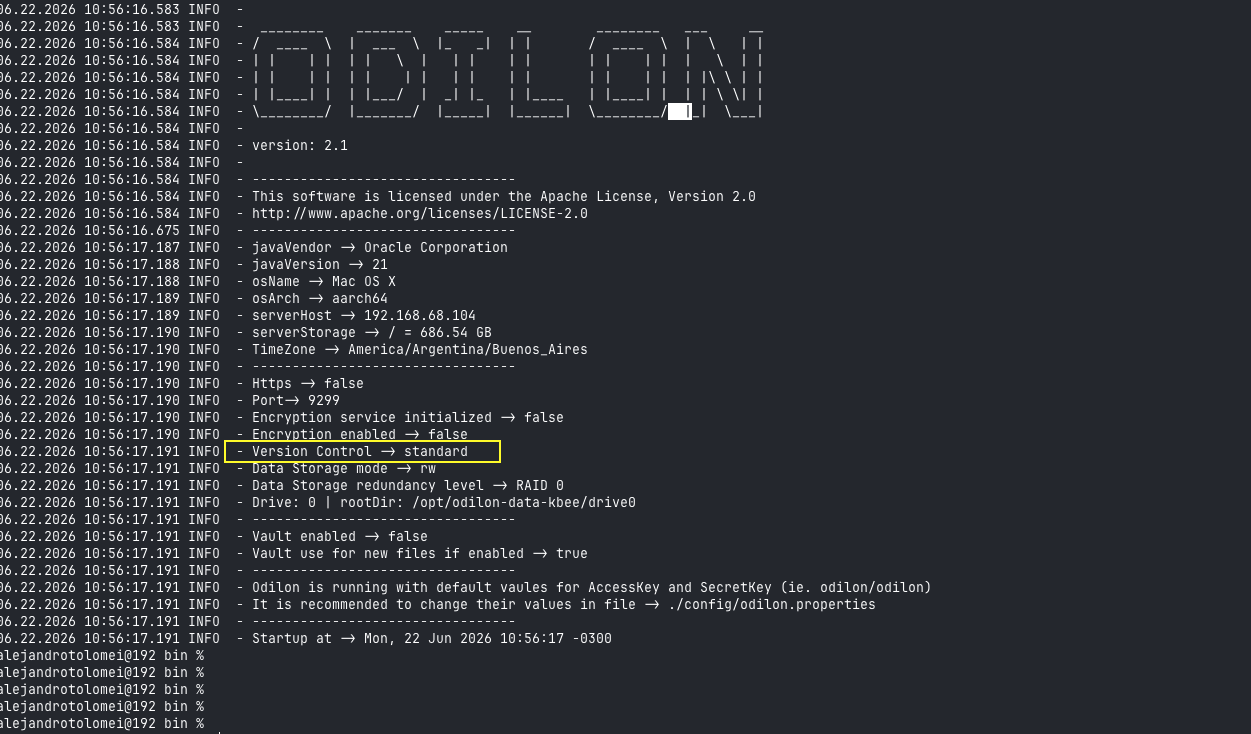
Version control and Master-Standby Replication
Note that if the server replicates to a standby Odilon server, then the standby instance must also have
version control enabled with the same set up.